(作業系統) Main Memory Management
本章內容 : 作業系統如何管理「主記憶體(RAM)」:讓多個行程安全、有效率地共用有限的記憶體。
前導
- 為什麼「主記憶體管理」很重要?
- CPU 只能直接存取主記憶體
- 記憶體是:
    - 昂貴
    - 有限

- 多個行程要一起用
    - OS 必須解決三個核心問題:
    - 誰用哪一塊記憶體?
    - 怎麼防止程式亂讀/亂寫別人的記憶體?
    - 怎麼讓記憶體使用率最高?
摘要
BackGround
- CPU 能直接存取的很少,只有Main Memory和 Registers而已
- Disk 上的程式,只是「檔案」而已,要被Loader載入memory才會變成Process
- 把多個程式放進 RAM → 多程式(multiprogramming): 改善CPU使用率以及加快反應時間
- process 會移動在Disk和memory之間
Memory Management Issues
- How to refer to memory in a program? → Address binding
- How to load a program into memory? → static/dynamic loading & linking
- How to move a program between memory and disk? → Swapping
- How to allocate memory? → Paging, Segmentation
Multistep Processing
- Source program(原始碼)
- Compiler/Assembler → Object module(目標檔 .o)
- Linkage editor(linker)
- 把你的 object 檔 + 其他 object 檔 + library 接起來
- 產生 Load module(可載入檔 / executable)
- Loader
- OS/loader 把 load module 放到 RAM,形成 in-memory binary image(記憶體中的程式映像)
- Dynamic linking(動態連結)
- 有些 library 不會在 linker 時就塞進去
會在「執行時」才載入/連結(例如共享函式庫 .so / .dll)
- 有些 library 不會在 linker 時就塞進去
因為「位址到底何時決定」有三種:
- 編譯期決定(compile time)
- 載入期決定(load time)
- 執行期決定(execution time)
基本觀念
- 每個Process會有自己的獨立記憶體空間,且不可以去存取其他Processes 的記憶體空間
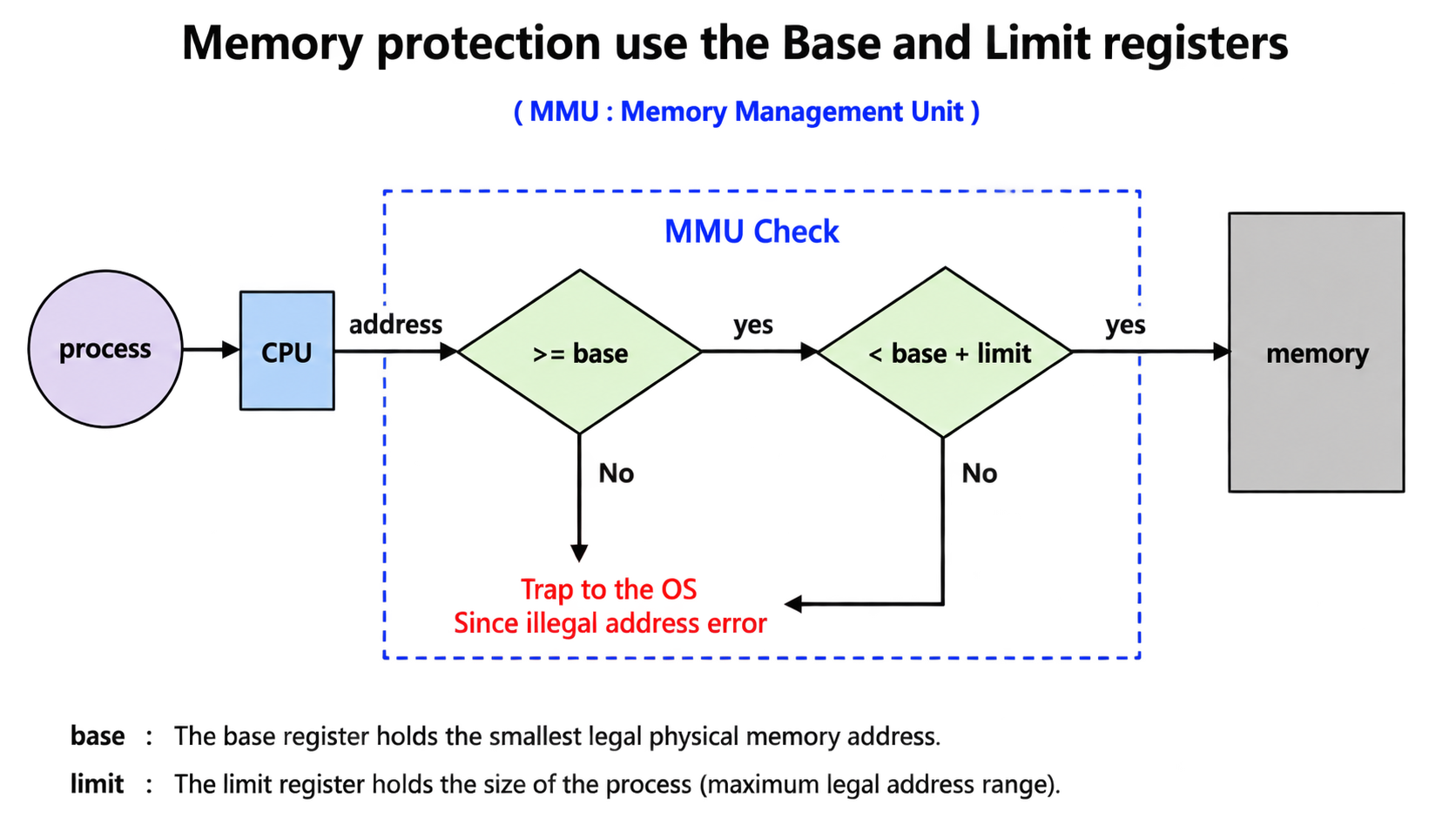
- 先前的Memory Protection (連續性)配置下
- BaseResister + Linit Register
Address Binding
前兩個是Static Binding
後一個是Dynamic Binding
Compile Time(編譯期綁定)
- 程式一開始寫的是symbolic address(符號位址)
symbolic address : 在寫程式、編譯之前或剛編譯完,程式裡出現的位址通常是:變數名稱、函式名稱、label、相對位置
- 在編譯期就決定他在Memory的絕對位址,編譯器就會產生絕對位址
✅ 結論
- 優點:簡單、快(不用 relocation)
- 缺點:起始位置一改就完蛋 → 必須重新編譯(recompile)
- 例子:老系統 MS-DOS .COM 程式(固定載入位置)
Load Time(載入期綁定)
- 由linking loader / linking Editor執行Binding
- 編譯器不產生寫死的絕對位址,而是產生 relocatable code(可重定位碼)
- 程式碼裡用「相對於起點」的方式表示位址(Ex. BS + 0x18)
✅ 結論(考點)
- 優點:同一份 executable 可以載入到不同位置
- 缺點:如果起點改了 → 不用重編譯,但要重新載入(reload)
- 這需要 loader 做 relocation(重定位)(通常靠 relocation table)
Execution Time(執行期綁定)
現代 OS 幾乎都用這個。
- Binding 工作延遲到Run Time
- 程式看到的是 logical address(i.e., virtual address)
- 例如它可能以為 data 在 0x18
- 真正的 physical address(例如 0x2018)由special hardware(ex.the MMU) 在每次記憶體存取時「即時轉換」
- MMU : CPU 發出 virtual address → MMU 翻成 physical address
✅ 結論(超常考)
- 優點:
- 程式可以在執行途中被搬家(支援 swapping / relocation / virtual memory)
- 每個 process 都可以有「自己的位址空間」(安全、隔離)
- 缺點:
- 需要硬體支援(MMU),會有轉換成本(靠 TLB 加速)
Memory-Management Unit(MMU)
- MMU 是 CPU 裡的硬體元件,在程式執行時把 Virtual/Logical Address(虛擬/邏輯位址)→ Physical Address(實體位址)。
- Translation mechanism :
- 例子 :
- CPU 產生 Logical Address =
346 - relocation register 位址
12000 - Physical Address = Base + Logical =
12000+346=12346 - 最後去 Memory 存取
12346
- CPU 產生 Logical Address =
- ✅優點:
- Memory protection(保護)
- 每個 process 只能在自己的範圍內活動。
- Dynamic relocation(動態搬家)
- base 改掉,整個程式的位址就「等效搬家」,不用重編譯。
- 支援 virtual memory
- Memory protection(保護)
Logical v.s. Physical Address
User program 只用 logical address,不需要知道 physical memory 在哪。
Logical Address(= Virtual Address)
- 也就是你程式碼多大
- CPU 在執行時產生的位址
- 使用者程式看得到、操作的位址空間
Physical Address
- RAM 裡真正的位址
- 最終由記憶體硬體去存取
跟 Address Binding 的關係
| 項目 | Compile-time / Load-time Binding | Execution-time Binding |
| ————————————- | ———————————————— | ——————————— |
| 位址綁定時機 | 執行前(compile 或 load 時) | 執行中(run time) |
| 位址是否先定死 | ✅ 是,已定成實體位址 | ❌ 否,執行時才轉換 |
| Logical address | = Physical address | ≠ Physical address |
| 是否需要 MMU | ❌ 不需要 | ✅ 需要 |
Load Program into Memory → static/dynamic loading & linking
Dynamic Loading
不需要整個 Program 載入 Memory → 用到再載入就好
- 只需載入被呼叫的程式碼進記憶體就好
- 沒被執行的就放在硬碟就好了
- ✅優點: 改善Memory utilization
- 實作 : 其實他理論上來說可以不用OS提供新的支援,可以用使用者層的方法做到
Static Linking
- 在link time時,將有用到的Libraries打包進可執行檔 → 單一包含所有需要程式的執行檔
- 特性 :
- 缺點:記憶體浪費(duplicate library code): 多個程式各自帶一份 libc → RAM 會出現多份重複
✅優點:
- 執行快
- 不用在 runtime 做符號解析(resolve),呼叫可直接跳
- 自給自足
- 不怕機器上缺 library(部署比較直覺)
Static Linking with Dynamic Loading
- 核心/常用部分:靜態連結
- 某些模組:用 dynamic loading 按需載入
- 但重複碼問題仍在:因為靜態連結的 library 每個 process 仍各有一份。
Trade-off Analysis
| 面向 | 重點 |
|---|---|
| Memory usage | ❌ 浪費(library 無法共用,每個 process 一份) |
| Execution speed | ✅ 快(direct calls) |
| Deployment | ✅ 簡單(無相依 library) |
| Updates | ❌ 不彈性(library 更新 → 需重新編譯/發佈) |
Dynamic Linking
Dynamic linking = 第一次呼叫要辦手續,之後就走快速通關
- 概念 :
- 連結時機延後到執行期(run time)
- Executable 不直接包含整套 library
- 只放 library function 的引用點(references)
- 關鍵機制:
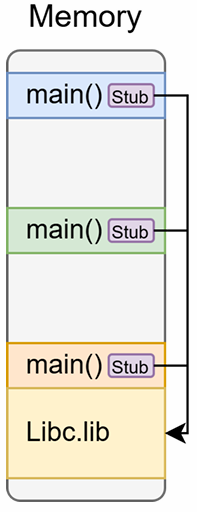
- 在 executable 中 , 每個 library function 呼叫點 , 插入一小段程式碼 → stub
- 需要OS額外支持,OS是唯一可以檢查其所需要ㄉroutine是在其他Processes所在的記憶體區域
✅優點 : Memory Efficiency
- Single copy of library code shared across all processes
- 多個程式使用同一個 library(如 libc)
- RAM 中只需要一份 library code(共享)
- 助Library自動更新且無須relinking (記,少考)
第一次呼叫 library function(First call)
- 程式先跳到 stub
- stub 檢查:
- library 是否已載入
- 該 function symbol 是否已解析
- 若尚未完成:
- 載入 library
- 解析 symbol(binding)
- 跳到真正的 library function 執行
後續呼叫(Subsequent calls):
- 不再做載入與解析
- stub 已更新跳轉位址
- 直接跳到 function
→ 執行速度接近 static linking
Static / Dynamic Loading & Linking:Four Combinations
Loading:什麼時候把 code 放進 RAM(startup vs on-demand)
Linking:什麼時候把外部符號/library 接起來(link time vs run time)
| 組合 | Linking(連結) | Loading(載入) | Pros(優點) | Cons(缺點) | 常見 Use case |
|---|---|---|---|---|---|
| (1) Static Linking + Static Loading | 編譯/連結時全部打包 | 程式啟動時整包載入 | 最快、最單純、完全自給自足 | Executable 最大、RAM 最浪費 | Embedded、關鍵系統工具 |
| (2) Static Linking + Dynamic Loading | 仍是靜態連結(不共享) | 用到模組才載入 | 起始 RAM 較省、不怕缺庫 | 跨 process 的 library duplication 仍存在 | Plugin 架構 |
| (3) Dynamic Linking + Static Loading | 執行期解析、可共享 | 啟動時就載入所有 shared libraries | 共享、省 RAM、更新較彈性 | 啟動較慢、可能載了用不到的庫 | 傳統 shared library |
| (4) Dynamic Linking + Dynamic Loading (Lazy) | 執行期才解析 | 用到才載、用到才解析 | 最省 RAM、啟動快、彈性最高 | 第一次呼叫有 overhead、實作較複雜 | 大型應用、現代 OS 預設 |
易混淆觀念對照
| 問題 | 正確理解 |
|---|---|
| Dynamic loading 是什麼? | 決定「程式碼何時進 RAM」(用到才載) |
| Dynamic linking 是什麼? | 決定「何時解析/接上 library 符號」(執行期,靠 stub) |
| 差別一句話 | 一個管 載入時機,一個管 連結解析時機 |
| dlopen 算什麼? | 課件中視為 dynamic loading 的典型例子(實務上同時牽涉 loading + linking) |
Swapping
定義 :
- Swapping = 把整個 process 在 Memory 與 backing store之間搬移,之後可以再搬回來接著執行
不同的點 :
- Scope : Entire process image
- Scheduler : Medium-term scheduler operation
- Swapping vs Context Switch :
- Swapping : 把 process 直接搬去 disk(人都不在 RAM 了)
- Context Switch : 只是換 CPU 跑誰(process 都還在 RAM)
Bccking Store
- Dedicated disk partition separate from file system
- direct block access to memory images
- Must accommodate all swapped processes
Swapping Triggers
- Memory pressure : RAM 快不夠
- Priority-based scheduling (Roll-out/Roll-in) : 高優先權的 process 需要 RAM → 把低優先權的「roll-out」出去
Swap-back Memory Address Requirements
| Binding 類型 | Swap in 可否到不同位址? | 原因(考試重點) |
|---|---|---|
| Compile-time binding | ❌ 不行(same address) | 使用寫死的絕對位址,放到別的位址會造成所有指令位址錯誤 |
| Load-time binding | ❌ 不行(same address) | Relocation 在載入時已完成,位址已被定死 |
| Execution-time binding | ✅ 可以(different address) | 有 MMU,Logical → Physical 於 runtime 轉換,只需更新 base / page table |
Swapping: I/O Problem
- The I/O Problem
- Process P 正在等 I/O
- OS 覺得 RAM 不夠 → 把 P swap out
- I/O 完成時,DMA 會把資料寫到「P 原本的記憶體位置」
- 結果:Data corruption(資料毀損)
Solution to I/O-Swapping Conflict:
Solution 1 : Never swap processes with pending I/O
- swap 之前先檢查 I/O queue
- I/O 進行中就把該 process 標記為 non-swappable
Solution 2 : Use OS-managed I/O buffers(kernel buffer)
- I/O 不要直接寫到 user space 的 buffer
- 改成先寫到 kernel buffer(不會被 swap)
- 等 process swap 回來後,再把資料 copy 回 user space
Process Swapping to Backing Store
Swap time components :
- Transfer Time (dominant factor) - Moving dadata between memory and disk
正比於process size : process 越大搬越久
- Latency : 磁碟的 seek + rotational delay
- Context switch overhead - OS bookkeeping
Memory Allocation Schemes (連續記憶體配置)
Fixed-Partition Allocation
- 做法 : 系統一開機就把 RAM 切成固定大小的 partitions
- 規則 : 每個 process 只能佔一格 partition。
- ✅ Multiprogramming degree = partitions 數量
- 因為同時最多就塞得下「partition 個 process」
- ✅ Multiprogramming degree = partitions 數量
- Partition selection - First-fit or Best-fit within available partitions
- ✅ 優點:簡單(表格也說 Simple)
- ❌ 主要問題:Internal fragmentation(內部碎裂) - 因為 partition 固定大小,process 可能用不滿
Variable-Partition Allocation
- 做法: 你要多少就切多少給你(依需求切一塊連續的)
- hole:一段連續的空閒記憶體區塊
- 多次 allocate/free 後,hole 會散落各處(各種大小)
- ✅ 優點:彈性高、初期利用率更好
- ❌ 主要問題:External fragmentation(外部碎裂)
Multiple Partition (Variable-Size) Method(可變分割到底怎麼運作)
- 如果要分配 , 找一個夠大的hole 切下來分配,會變成一個較小的hole(split)
- Data Structure
- Allocation Table(已配置表)
記每個 process 用哪一段:(PID, base, limit) - Free List(空閒表)
- 記所有 holes:(base address, size)
- allocate/free 都要動態更新
- Allocation Table(已配置表)
- 相鄰的 holes 應該自動合併(merge)
- Implementation
- allocate:如果 hole 比需求大 → 切割
- deallocate:釋放後變 hole → 看左右是否也是 hole,能合就合
Dynamic Storage Allocation Problem
3個演算法
- First-fit(第一個放得下就用)(O(n))
- Next-fit 的變形
- ✅ 優點:平均最快
- 缺點:前面區域容易被切得很碎(很多小洞集中前面)
- Best-fit(找「最小但夠用」的 hole)(O(n))
- ✅ 好處:這次剩下的碎片最小(“看起來”很省)
- ❌ 壞處(投影片紅字):會產生很多超小、用不到的洞
- Worst-fit(找最大的 hole)(O(n))
- 挑最大的 hole 來切
- 理論:留下的大碎片比較可能再放大 process
- First-fit 和 Best-fit 通常勝過 Worst-fit
- First-fit 通常最快,而且利用率跟 best-fit 差不多
- Best-fit 不一定真的最優
Memory Fragmentation
External Fragmentation(外部碎裂)
定義(申論) : 在連續性配置下, 我們在AV-List找不到一個free hole size可以滿足process size,但free hole size加總卻 >= process size,但因為不連續所以無法配置給此processes
Total free memory ≥ request size,但不連續(not contiguous)
- 出現在 Variable-size partition(可變分割)
- 所有連續性記憶體配置方法皆會遭遇外部碎裂
- 經驗法則顯示 : 約每 N 個 allocated blocks 會有 0.5N 個 holes ,也就是大約有1/3 memory may be un useable, 又叫做 50 percent rule or one-third rule**
Internal Fragmentation(內部碎裂)
- 連續性配置沒有內部碎裂
- 已分配出去的 partition 裡面,但 process 沒用到的空間
- 出現在 Fixed-partition(固定分割)
Solution : Memory Compaction
把所有 processes「搬到一起」,把 holes 集中成一個大洞
需要 Dynamic binding(execution-time binding)
Constraints :
- 需要 relocatable code / MMU
- overhead 很高:要搬「所有」process
- 系統可能要暫停/凍結 在 compaction 期間
Non-Contiguous Memory Allocation - Paging
Paging Concept
Core mechanism
- Physical memory(實體記憶體 RAM 切成固定大小小格子:叫 frames
- Logical memory(邏輯/虛擬位址空間 也切成一樣大小小格子:叫 pages
- page/frame 大小通常是 2 的次方(4KB、8KB…)
- 因為這樣「位址切割」可以用 bit 切:右邊 n bits 當 offset
Process 要能執行,需要什麼?
- 程式如果有 n pages,就需要 n 個可用 frames(不要求連續)
- OS 會維護:
- free frame list:哪些 frame 還空著
- page table:把每個 page 對到哪個 frame(做位址轉換)
- Address translation
- Logical Address = [Page Number | Page Offset]
→ (via page Table)→
Pysical Address = [Frame Number | Page Offset] - 重點:offset 不變(因為 page 和 frame 大小一樣)
- Logical Address = [Page Number | Page Offset]
Paging 的 4 大好處
這頁就是「為什麼 paging 比 variable partition 好」。
1) Noncontiguous allocation(可不連續)
- pages 可以散落在任何 frames
- OS 不用再煩惱找一大段連續洞
2) Eliminates external fragmentation(消除外部碎裂)
- 因為不再需要連續的大洞
- 所有空間都以 frame 為單位可用
Paging 解掉 external fragmentation。
3) Minimal internal fragmentation(仍有少量內部碎裂)
- 只可能發生在 最後一頁(因為程式大小不一定剛好整除 page size)
- 平均浪費:半頁 / process
Paging 沒有 external fragmentation,但有 internal fragmentation(平均半頁)。
4) Enables memory sharing(支援共享)
- 多個 process 可以把某些頁 map 到同一個 physical frame
- 常見:共享的程式碼段(shared libraries)、共享記憶體
壞處
5) 會有內部碎裂
6) Pageing 可能會提升context switch Time
7) 需要硬體的支援
- page table製作
- Logical address -> Physical Address by MMU
Page table fundamentals
- 把 logical page number → physical frame number
- 每個 process 一張 page table
- page table entry(PTE)至少要存:frame number
3 大特性 :
- Process isolation(隔離)
- Memory protection(保護)
- Address translation(轉換)
Address Translation Scheme
Logical address 結構
m-bit logical address
- page number
p:m-n bits - offset
d:n bits
- page number
p(page number)的意義p是 page table 的索引(index)- m-n bits → 最多可表示 2^(m-n) 個 pages
- 最大 logical memory:
- pages 數量 2^(m-n) × 每頁大小 2^n bytes
- =
2^mbytes(剛好對應 m-bit 位址空間)
d(page offset)的意義d是「在 page/frame 裡面的位移」- n bits → page size = 2^n bytes
- translation 時 d 不變
- 最後 physical address = frame base address + d
Translation formula
- Physical Address = (Frame Number × Page Size) + Offset
= Frame base + d
Address Translation
- Page size = 4KB = 2¹²→ Offset bits = 12
先看 page size → 算 offset bits
位址總 bits − offset bits = page / frame number bits
2^(number bits) = pages / frames 數量
2^(address bits) = 最大記憶體大小
Logical Address Space(32-bit)
| 項目 | 計算 | 結果 |
| —————————— | ————- | —————— |
| Logical address bits | 已知 | 32 bits |
| Offset bits | 4KB = 2¹² | 12 bits |
| Page number bits | 32 − 12 | 20 bits |
| Pages per process | 2²⁰ | 1M pages |
| Max process size | 2³² bytes | 4 GB |Physical Address Space(36-bit)
| 項目 | 計算 | 結果 |
| ——————————- | ————- | ——————— |
| Physical address bits | 已知 | 36 bits |
| Offset bits | 4KB = 2¹² | 12 bits |
| Frame number bits | 36 − 12 | 24 bits |
| Total frames | 2²⁴ | 16M frames |
| Total physical memory | 2³⁶ bytes | 64 GB |Page Table(每個 process)
| 項目 | 計算 | 結果 |
| ————————— | ——————- | —————————— |
| Page table 數量 | 每個 process 一張 | 1 |
| Page table entries | = pages 數量 | 2²⁰ = 1M entries |
Page/Frame Size Considerations
1) 為什麼 page size 由硬體決定、且必須是 2 的次方?
- 因為位址要用 bit 切:
- 低 n bits = offset
- 高位 = page/frame number
- 不是 2 的次方就不好用位元運算切割
2) 常見大小與趨勢
- 常見:4KB、8KB
- 範圍:512B 到 16MB
- 現代也有 huge pages(2MB、1GB)給特定工作負載
3) Internal fragmentation 分析
- 平均每個 process 的內部碎裂 ≈ page_size / 2
- page 越大 → 浪費越多(最後一頁平均半頁浪費會變大)
4) 為什麼歷史上 page size 變大?
- 記憶體系統變大(GB/TB 時代)
- dataset 變大(DB、科學運算)
- I/O 最佳化:page fault overhead 相對變高,頁大可以減少 fault 次數(某些情境)
- TLB 壓力:TLB entries 有限,頁大可以讓 TLB cover 更多記憶體(TLB reach 變大)
Paging Summary
- Memory Abstraction Achievement
| 使用者看到 | OS / 硬體實際做的 |
|---|---|
| 連續的 logical address space | Pages 分散在不連續的 frames |
| 0 ~ max 的連續空間 | MMU + page table 做轉換 |
| 感覺不到搬家 | 位址轉換對程式 透明 |
- OS 兩大關鍵資料結構
Page Table(per-process)
| 項目 | 說明 |
| ——————— | ———————————————- |
| 數量 | 每個 process 一張 |
| 功能 | Logical pages → Physical frames |
| 提供 | 隔離、保護 |
| Context switch | 需要切換 page table base |
Frame Table(system-wide)
| 項目 | 說明 |
| —————- | ——————————————————— |
| 數量 | 全系統一張 |
| 對象 | 每個 physical frame 一個 entry |
| 記錄內容 | free / allocated |
| 若被佔用 | owner:PID + page#(共享則是清單) |
| 其他 metadata | reference count、dirty bit、lock status… |
Implementation of Page Table
三種方法
1) 使用Register : 最簡單
- 不須記憶體存取,所以快速
- 對於大型Page Table 不適合,因為Register數量不構
2) Page table 存放(Storage)
- Page tables reside in **main memory** (too large for registers)
- **PTBR(Page-Table Base Register)**
    - 記錄分頁表在 memory 的位址
- PTBR **存在 PCB(Process Control Block)**
- 所以 context switch 時,OS 會把新 process 的 PTBR 載入(等於換一張 page table)
- Memory access overhead
- 沒有 TLB 時,每次存取一個 logical address 要做兩次記憶體存取:
    - 先去 memory 裡找 page table entry(用 PTBR + page#)
    - 再去 memory 裡拿真正資料(frame# + offset)

    | 情況           | 你要拿到「資料」前要做什麼      | 需要幾次 memory access |
    | ------------  | ------------------ | -----------------: |
    | 沒有 TLB       | 先查 page table,再讀資料 |                  2 |
    | 有 TLB 且 hit  | 直接得到 frame#,讀資料    |                  1 |
    | 有 TLB 但 miss | 查 page table + 讀資料 |                  2 |
3) Solution:TLB
- TLB = Translation Look-aside Buffer
- 是在 MMU 裡的硬體 cache
- 記最近用過的 page→frame 對應
- 目的:讓大多數存取變成「一次 memory access」
Associative Memory / CAM
TLB 用的記憶體型態是 Associative Memory / CAM(Content-Addressable Memory)
特色:不是用「位址」找資料,而是用「內容」找。
Key characteristics
Parallel search:所有 entries 同時比對
Search by content:輸入 page number(通常還會加 ASID),輸出 frame number
Access time O(1):不管幾筆,都像一次查找
| 項目 | CAM / TLB 的特性 | 代價 |
|---|---|---|
| 查找速度 | 平行比對,接近 O(1) | 電路複雜、成本高 |
| 功耗 | 多路同時比較 | 耗電高 |
| 容量 | 不能太大(64–1024 entries) | 命中率受限 |
- Performance characteristics
- TLB hit: 只要 1 次 memory access(直接去拿 data)
- TLB miss: 變回 2 次(page table + data)
- Replacement policy:常見 LRU(TLB 滿了要踢誰)
Translation Lookaside Buffer (TLB)
TLB 是什麼?
- 「硬體快取」保存最近的 virtual→physical 轉換
- shared by all processes(同一顆 CPU 的 TLB 不是每個 process 一份)
但 shared 會有問題:context switch 後,舊 process 的轉換還留在 TLB
| 方法 | 做法 | 優點 | 缺點 |
|---|---|---|---|
| Option 1:Flush TLB | context switch 時整個 TLB 清空 | 簡單、安全 | 很貴:切換後命中率掉,變慢 |
| Option 2:ASID tag | 每個 TLB entry 加上 ASID 標籤 | 不用清空,效能好 | 硬體較複雜,要有 ASID 支援 |
ASID(Address-space identifier)
- Context Switch 之後TLB裡面原本Process的資料怎麼辦?
- 用ASID讓不同Process的TLB Entry 同時留在TLB裡
- 使用Address Space的標籤標記這是哪一個Process的
- Context Switch 也就不用Flush整個TLB
| ASID | Page | Frame |
|---|---|---|
| 1 | 3 | 8 |
| 2 | 3 | 8 |
EMAT(Effective Memory-Access Time)
「平均一次記憶體存取要多久」,取決於 hit ratio。
公式 :
Memory Protection(Page table entry 裡的保護位)
常見 protection bits
Read-Write or Read-only bits
- R/W/X:可讀、可寫、可執行
Valid/Invalid bit
- Valid vs Invalid(這是 OS 保護的關鍵)
- Valid (v):此 page 在該 process 合法的 logical address space 內,可被存取
- Invalid (i):不在合法範圍內
- 程式一旦存取 invalid page → page fault(trap to OS)
- Valid vs Invalid(這是 OS 保護的關鍵)
Valid-Invalid Bit:Implementation Issues
Issue 1:Unused page table entries
- process 不一定用滿整個 logical space
但傳統 page table 看起來像要準備「所有可能 pages」的 entries(很浪費) - 解法:PTLR(Page Table Length Register)
Issue 2:Non-page-aligned process memory
- process 的「結束位址」可能不剛好切齊 page boundary
- 所以最後一頁裡面會有一段「在 valid page 裡,但其實超出程式真正大小」的區域 valid but illegal
- 解法:還需要 limit registe
| 機制 | 管什麼 | 解決哪個問題 |
|---|---|---|
| PTLR | page table 有效 entries 的數量/範圍 | 防止存取超出「最後一個 page」之外 |
| limit register | process 真正結束的「位址」 | 防止存取最後一頁內「valid page 但超出程式大小」的區域 |
Shared Pages
- Paging 可以讓多個 process 共享同一份 code
共享的前提:shared code 必須是 reentrant(pure code)
重點特性:
- Read-only:執行中不修改(不然大家改同一份會互相影響)
- Self-contained:不依賴每個 process 自己的私有狀態
Memory efficiency :
物理記憶體只放 一份 shared code
多個 process 的不同 virtual addresses都可以 map 到同一個 physical frame
每個 process 仍保有自己的 private : data、heap、stack、process-specific code
Shared Pages via Page Tables
共享的 code 必須出現在所有共享 process 的 same virtual address
Why ?
- reentrant code 仍可能含 position-dependent instructions
- 例如 jump/call 用「相對位址」或某些基於位置的計算
- 如果同一份 shared code 在不同 process 被映射到不同 virtual address
→ 這些位置相關指令可能指到錯地方
Page Table Structure:Scalability Problem
「單層 page table 會爆炸」
Challenges :
- page table 太大,不可能放 registers/cache
- 放在 memory 又會影響效能
- sparse address space:很多 entries 根本用不到,卻佔空間
Design goals:
把大 page table 切成小單元(理想每單元 ≤ 4KB)
降低總 memory overhead
仍要能有效Translation
Solutions
- Hierarchical (multi-level) paging (計算):多層頁表(常見)
- Hashed page tables:用 hash 減少表大小(大位址空間用)
- Inverted page tables:每個 physical frame 一筆(不是每個 virtual page 一筆)
| 方法 | 核心想法 | 直覺記法 |
|---|---|---|
| Multi-level paging | 只為「用到的那部分」建下一層表 | 用到才展開 |
| Hashed page table | virtual page 先 hash,查 bucket | 用雜湊縮小查找 |
| Inverted page table | 以 physical frame 為主,一 frame 一 entry | 表大小跟 RAM 成正比 |
Hierarchical Paging、Hashed Page Table、Inverted Page Table, IPT
| 方法 | 核心想法 | 適合用在哪 |
|---|---|---|
| Hierarchical Paging(多層頁表) | 把「超大的頁表」切成多層,用索引分段,只為用到的區塊配置下層表 | 常見 CPU 架構(x86-64/ARM64),通用、穩 |
| Hashed Page Table(雜湊頁表) | 用 hash(VPN) 快速定位可能的頁表項,碰撞就用 chain(鏈結串列) | 超大位址空間、而且很稀疏(很多虛擬頁根本沒用到) |
| IPT(反向頁表) | 不再「每個虛擬頁一筆」,改成「每個實體 frame 一筆」→ 整台機器只有一張表 | 64-bit 大系統想大幅省頁表記憶體,但查找會更麻煩 |
VPN = Virtual Page Number(虛擬頁號),PFN/Frame# = Physical Frame Number(實體 frame 編號)
Hierarchical paging的目標:「頁表不要一次整張都配置,用到哪一段才開哪一段。」
- Logical address = [ p1 | p2 | d ]
- 只有當某段虛擬位址真的被用到,才需要那張 inner table 存在
- 需要多次額外的記憶體來存取,EMAT 會非常長
- Example :
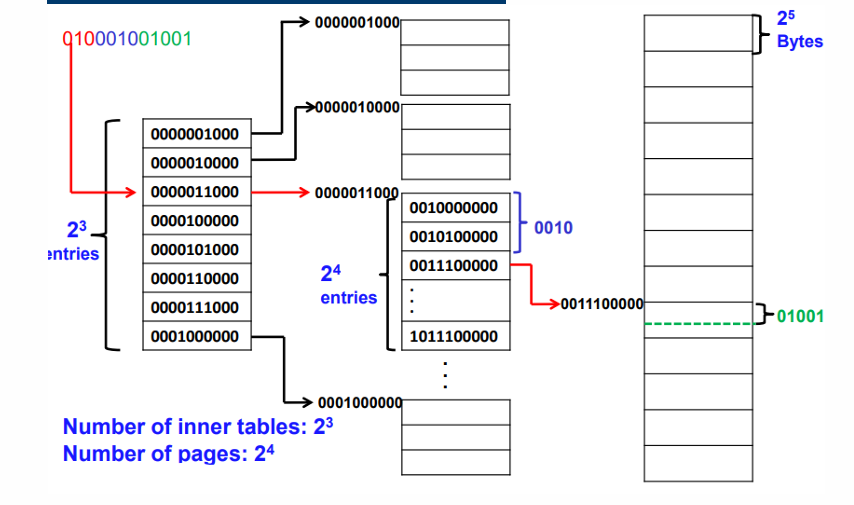
- 結論:不實際。
Hashed page table : 想用 hash 直接跳到「可能的位置」,少走好幾層。
- 核心結構:
- 用 VPN 做 hash:index = hash(VPN)
- hash_table[index] 指向一條 chain(linked list)
- chain 每個節點通常包含:
- VPN(Virtual Page Number)(用來比對是不是你要的)
- PFN/frame(對應到哪個實體 frame)
- next pointer(下一個節點)
缺點:
- Collision 造成 chain 變長
- table 越大 → collision 越少 → chain 越短 → 越快
- table 越小 → collision 越多 → chain 越長 → 越慢
- 指標開銷(尤其 64-bit 指標 8 bytes)
- 每個節點/entry 需要 pointer,記憶體會多一些。
- Collision 造成 chain 變長
Translation
取出 VPN(p)
算 index = hash(VPN)
到 hash table 的那個 bucket
沿著 chain 一個個比 VPN
找到 → 拿 frame number;找不到 → page fault
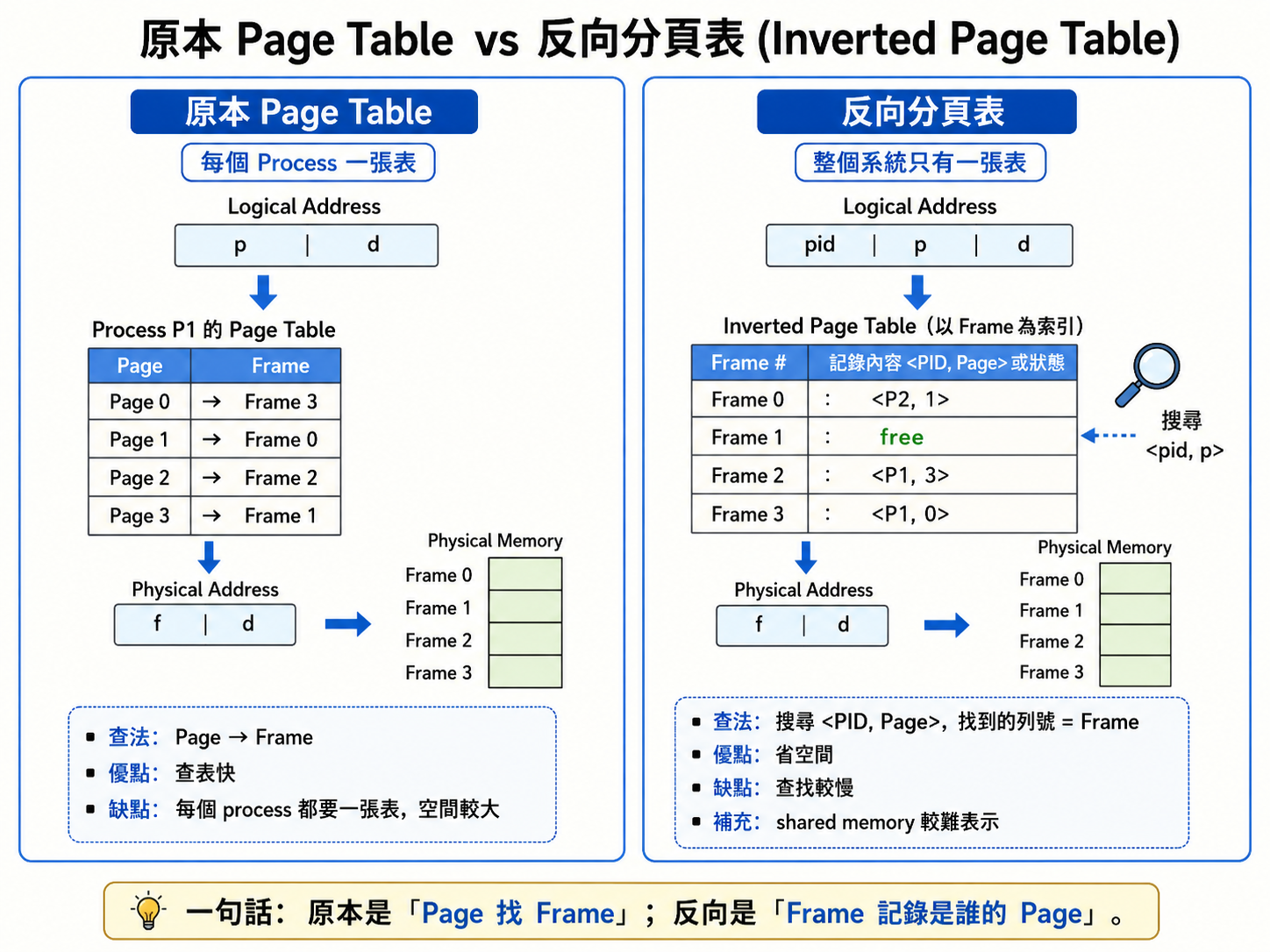
Inverted Page Table (常考)
- IPT:整台機器 只有一張表
- 每個實體 frame 一筆
- 一筆內容大概是:
- PID(Process ID):這個 frame 現在屬於哪個 process
- VPN(Virtual Page Number):對應到該 process 的哪個虛擬頁
- control bits(valid/dirty/reference/protection…)
- 所以表大小 ≈ 實體記憶體有多少 frames
- 優點 : 減少記憶體所需數量去儲存page table
缺點 :
- 需要一一比對,增加大量搜索時間
- 無法提供shared memory
Translation:
CPU 給 logical address,現在會是:
PID(當前 process)
VPN(p)
offset(d)
- 目標是找到「哪個 frame i 對應到 (PID, VPN)」
- 整張 IPT 從頭掃到尾找 (PID,VPN) ⇒ O(n)(n = frames 數)很慢
- 會用 hash(PID, VPN) 加速(平均查找時間下降),而且還是要靠 TLB 才能實用。
IPT 的共享記憶體(shared pages)為什麼麻煩?
- 多個 process 的不同 VPN,要映到同一個 PFN/frame
但 IPT 每個 frame 通常只放 一組 (PID, VPN)
所以共享時會卡住:「這個 frame 到底要記誰的 PID/VPN?」IPT shared-memory 三個解法比較表
| 解法 | 怎麼做 | 優點 | 缺點/代價 | 你可以怎麼記 |
| ———————————————————————- | ———————————————————————————- | ————————— | ————————————————- | ———————- |
| Allow multiple entries per frame | 一個 frame 對應多組 (PID,VPN)(像一對多清單) | 最直觀,能完整表示共享 | 查找/維護更複雜;每個 frame entry 變大(更多記憶體) | 「frame 裡放名冊」 |
| Separate data structure for shared pages | IPT 維持 private pages;共享頁另外有一張結構(shared table)記映射 | IPT 本體簡潔;共享管理集中 | 多一套資料結構要同步維護;系統更複雜 | 「共享另開一本簿」 |
| Hybrid approach | private pages 用 IPT;shared pages 用傳統 page table | 實務上常用的折衷:省很多又能處理共享 | 兩套機制並存,設計更複雜 | 「私用走 IPT,共享走傳統」 |
總比較:
| 面向 | Hierarchical Paging | Hashed Page Table | Inverted Page Table (IPT) |
|---|---|---|---|
| 頁表以誰為單位 | 每個 process 一套(多層) | 通常每個 process 一套(hash 結構) | 全系統一套(每個 frame 一筆) |
| 主要解決 | 頁表太大 → 分層、按需配置 | 64-bit 稀疏空間 → 用 hash 快找 | 頁表記憶體爆炸 → 表大小跟 frames 綁定 |
| TLB miss 時成本 | 要走多層(層數越多越慢) | hash + traverse chain | 找 (PID,VPN)→frame(常搭 hash) |
| 最大優點 | 通用、硬體常見、好保護 | 稀疏時省、可快 | 省頁表記憶體「非常多」 |
| 最大缺點 | 層數多時,TLB miss 很痛 | collision/chain 會拖慢;指標開銷 | 共享頁麻煩;查找複雜,仍需 TLB |
Segmentation
Segmentation = 讓記憶體看起來像「程式設計師理解的模組」
跟 Paging 最大差別:
Paging 把記憶體切成固定大小 page/frame(對程式員「看不見」)(Physical viewpoint)
Segmentation 直接用程式的邏輯結構來切(對程式員「看得懂」)(Logical viewpoint)
重要特性 :
- 每個 segment 有名稱或編號(segment number)
- segment 大小是可變的(variable size)
- 每個 segment 都是語意上有意義的單位
- 不同 segment 可有不同權限(例如 code:可執行但唯讀;data:可讀寫)
- 段與段之間可以是不連續性的配置
- 但是就單一個段而言,必須採用連續性配置
Segmentation 的 Logical Address - Logical Address =
s (segment number):你要存取哪一段(第幾段)
d (offset):在該段裡面第幾個 byte
每個 segment 在實體記憶體中可以被放在任何地方(不必連續、也不必靠在一起)
注意:每個 segment 自己本身通常需要一塊連續的實體空間(因為它是 base+offset 這種算法)。
Segmentation Table(分段表)
| 欄位 | 意思 | 用途 |
|---|---|---|
| base | 這個 segment 在 physical memory 的起始位址 | 用來做 base + offset |
| limit | 這個 segment 的長度(或最大合法 offset) | 用來做保護/界限檢查 |
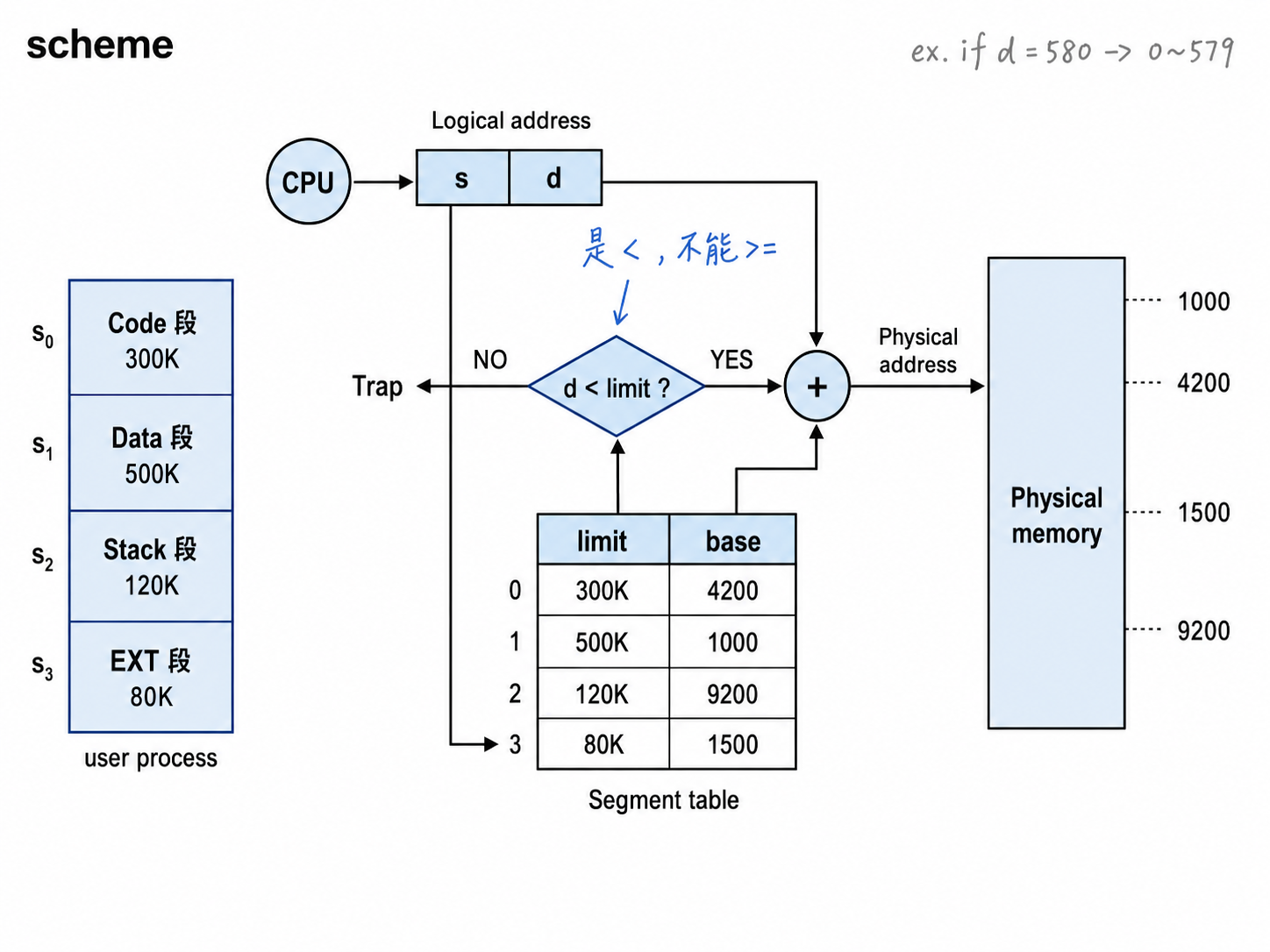
硬體暫存器:STBR / STLR
每個 process 都有自己的 segment table」,所以硬體要知道
- 這張表在哪?
- 這張表多長?(有幾個 segments)
| 暫存器 | 全名 | 放什麼 | 何時更新 |
|---|---|---|---|
| STBR | Segment-Table Base Register | segment table 在實體記憶體的起始位址 | context switch 換行程時 |
| STLR | Segment-Table Length Register | 這個行程有幾個 segments | context switch 換行程時 |
STLR 的用意:避免你用不存在的 segment number
若 s ≥ STLR → 直接 trap(非法段)
Translation
給定 logical address ⟨𝑠,𝑑⟩
Step 1:段號合法嗎?
- 如果 s ≥ STLR → TRAP(segment fault)
Step 2:去 segment table 拿 entry
- entry_address = STBR + s × entry_size
- 讀出 base 與 limit
Step 3:offset 合法嗎?
- 如果 d ≥ limit → TRAP(越界)
Step 4:算 physical address
- PA=base+d
Step 5:去記憶體存取資料
- Memory access cost(為什麼這頁提成本)
如果沒快取(像 TLB):
第 1 次 memory access:讀 segment table entry(base/limit)
第 2 次 memory access:讀真正資料
→ 所以是 2 次 memory access / 每次位址轉換
MMU 會做三件事
做 address translation(logical → physical)
做 bounds checking(用 limit 檢查 d)
違規就產生 trap(保護)
Segmentation =(STBR 找表)→(s 找 entry)→(limit 檢查 d)→(base + d)
Segmentation vs Paging
| 比較項目 | Paging | Segmentation |
|---|---|---|
| 大小 | 各 Page Size 大小相同 | 各 Segment 大小不一定相同 |
| 觀點 | Physical (Hardware) Viewpoint | Logical (User) Viewpoint |
| 外部碎裂 External Fragmentation | 沒有 | 有 |
| 內部碎裂 Internal Fragmentation | 有 | 沒有 |
| Memory Sharing & Protection | YES,但比較困難實施 | YES,容易實施 |
| EMAT | 比較短 | 比較長(因為需要檢查 d < limit) |
| Need Hardware Support | YES(Page Table、MMU) | YES(Segment Table、MMU) |
| Table 內容 | Page Table 記錄 frame no. |
Segment Table 記錄 base 和 limit |
| Logical Address | 一個位址,由硬體自動拆成 (p, d) |
兩個量 (s, d) |
Logical address 格式比較
| Scheme | Logical Address Format | 你在指定什麼 |
|---|---|---|
| Segmentation | ⟨segment#, offset⟩ | 「第幾段」+「段內位移」 |
| Paging | ⟨page#, offset⟩ | 「第幾頁」+「頁內位移」 |
Table entry 結構比較
| 項目 | Segmentation Table Entry | Page Table Entry |
|---|---|---|
| 核心欄位 | base + limit + control bits | frame# + control bits |
| 為什麼要 limit | segment 大小可變,必須防越界 | page 固定大小,offset 天生不會超過 page size |
| 放置方式 | 每段在實體記憶體可放任意起點(base 任意) | frame 起點 = frame# × page_size(固定對齊) |
Sharing of Segments
共享 = 兩個 process 的 segment table entry 指向同一個 physical base
Segmentation 很自然支援共享:把「同一段」映射到「同一塊實體記憶體」
Protection and Sharing in Segmentation
分段的每個 segment entry 不只有 base/limit,還有 protection bits;
共享就是「不同 process 的 segment table 指到同一塊實體記憶體(同一個 base)」。
Segment Entry: [ Base | Limit | Protection Bits ] ← R/RW/RX/RWX
- Base:這個 segment 在記憶體中的起始位址(實務上可理解為線性/實體某個起點,取決於你的架構)
- Limit:segment 的長度(或最大合法 offset)
- Protection Bits:權限控制
Code sharing occurs at segment level
- 整包 code 一段(text segment)
- 整包 data 一段(data segment)
- stack 一段、heap 一段
- shared lib 一段
- Key Principle:每次存取都檢查保護;共享靠共同映射
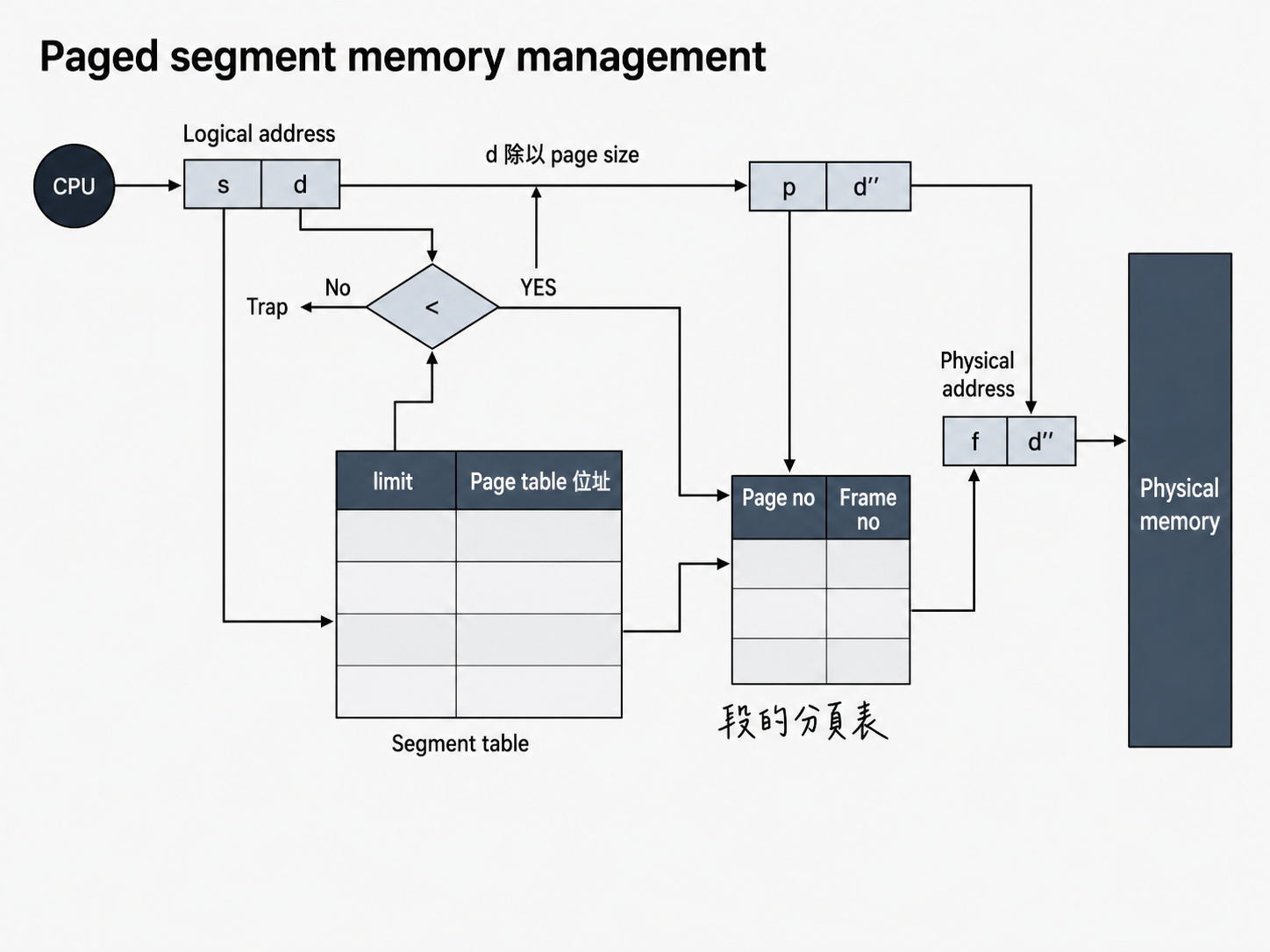
Segmentation with Paging
- Paged Segment
- 段再分頁
- Apply segmentation in logical address space
- 程式員/OS 想像中的記憶體(Logical / Virtual view)→ 用 Segmentation
- Apply paging in physical address space
- 真正硬體的 RAM(Physical memory)→ 用 Paging
Address Translation(logical → linear → physical)
| 名稱 | 你可以把它想成 | 由誰產生/看到 | 下一步 |
|---|---|---|---|
| Logical address(邏輯位址) | 「程式用的位址」(常見:<segment, offset> 或虛擬位址) |
CPU 在執行指令時產生 | 交給 segmentation unit |
| Linear address(線性位址) | 「把 segment 翻譯完後的結果」:一條 0..max 的連續位址 | segmentation unit 輸出 | 交給 paging unit |
| Physical address(實體位址) | 真正 RAM 上的位置 | paging unit 輸出 | 去 RAM 讀/寫 |
Segmentation with Paging(Paged Segmentation / 段再分頁)(現Removed)
核心概念
Paged Segmentation = 先 Segmentation,再對每個 Segment 做 Paging
Logical / Virtual View → 使用 Segmentation
- 將程式依邏輯分成 Code、Data、Stack 等 Segment
- 各 Segment 大小可以不同
- 方便 Memory Sharing / Protection
Physical Memory → 使用固定大小的 Frame
- 每個 Segment 再切成固定大小的 Page
- Page 可以放到任意 Frame
- 因此避免 External Fragmentation
簡單理解:
1 | Process |
Logical Address
原本 Segmentation:
$
(s,d)
$
s:Segment numberd:Segment 內的 offset
因為每個 Segment 又做 Paging,因此 d 可以再拆成:
$
d \rightarrow (p,d’)
$
所以 Logical Address 也可以看成:
$
\boxed{(s,p,d’)}
$
s:哪個 Segmentp:該 Segment 的 Page numberd':Page offset
Address Translation
1 | Logical Address |
Step 1:CPU 產生 Logical Address
$
(s,d)
$
Step 2:用 s 查 Segment Table
Segment Table 每個 entry 記錄:
limit- 該 Segment 的 Page Table 位址
注意:與單純 Segmentation 不同,這裡不是記
base。
Step 3:檢查 Segment 是否越界
$
d < limit
$
- YES → 繼續
- NO → Trap
Step 4:將 d 拆成 Page Number 與 Page Offset
$
p=\left\lfloor\frac{d}{PageSize}\right\rfloor
$
$
d’=d\bmod PageSize
$
因此:
$
d\rightarrow(p,d’)
$
Step 5:用 p 查該 Segment 的 Page Table
Page Table 記錄:
1 | Page no. → Frame no. |
查到:
$
p\rightarrow f
$
Step 6:形成 Physical Address
$
\boxed{(f,d’)}
$
Table 內容整理
Segment Table
| 內容 | 功能 |
|---|---|
limit |
檢查 Segment 是否越界 |
| Page Table 位址 | 找到該 Segment 對應的 Page Table |
Page Table
| 內容 | 功能 |
|---|---|
| Page no. | Segment 裡的 Page |
| Frame no. | 該 Page 實際放在哪個 Physical Frame |
優點
沒有 External Fragmentation
- Physical Memory 使用固定大小 Frame
保留 Segmentation 的優點
- 容易做 Memory Sharing
- 容易做 Protection
- 符合使用者的 Logical View
缺點
Table 數目較多
- Segment Table
- 各 Segment 的 Page Table
EMAT 較長
- 要先查 Segment Table
- 再查 Page Table
- 還要檢查
d < limit
需要額外 Hardware Support
仍有 Internal Fragmentation
- Segment 最後一個 Page 可能沒有填滿